Over at Tech for Home Healtcare, I’ve described how the Alabama Eye Bank uses FileMaker Pro to manage the process of receiving donated corneas thorough finding a recipient and scheduling the surgery. It is an amazing application that shows the cross-platform versatility of FileMaker, hosted on Windows servers, and deployed to Mac workstations, iPads, and iPhones.
Author Archives: lkeyes70
Refurbished Desktop Computers
Refurbs are for when you have more time than money. I’m not sure about the exact figure, but in many cases, I think I’ve ended up spending several hours per unit getting a refurbished computer back online after a hard drive failure, or just having to spend hours updating Windows and Office so that I’m confident getting the machine on the network.
We got several “really good deals” from NewEgg, for refurbished Lenovo desktop computers at $214.00. These appeared to be of “office quality”, included Windows 7 Pro, and were nicely finished. Unfortunately, we have had 2/3 of the Western Digital Blue hard drives start to fail at some point. This has created no end of extra heartache for the users and an enormous amount of work for the IT staff.
NewEgg has been fine on returns, however, providing UPS shipping labels, and RMA procedures over the web.
OK….so much for NewEgg. We’re looking at alternatives. (we have more time than money).
Techsoup has Dell refurbished computers that are prepared by a third party. For example:
One advantage here is that if you need licenses for Windows 7 and Office, they are included in the price. You would spend the $286.00 on those if you bought at retail, and maybe quite a lot less if you have a Microsoft Open, agreement. But, it like getting the hardware free.
The Dell Outlet looks promising with several machines in the $315-$390 range which still include Windows 7 as opposed to Windows 8, and have at least 500Gb drives, and 4 Gigs of RAM. These have more up-to-date processors than the Techsoup machines, and are certainly not as old. Most Dell Outlet machines were either not delivered, or were taken back within the warrenty period.
I’ve had solid results with Dell Outlet computers at the workstation and server level; mixed results with standard desktop machines, and a real disaster with older SX-series Optiplexes. The best seem to be the larger ones; towers or mini-towers. Smaller machines, “mini-desktops” may have suffer from the suboptimal cooling, and the older components may have reached their design end-of-life earlier than those installed in a larger case.
One thing we have often found is that dual monitors are wonderful, and this is something that I would recommend for anyone as a matter of course. If you need an extra monitor card, these can be found from NewEgg starting at around $35.00. Best to wait until you have received the machine, because there can be variations in the slots, and the available adapter space that aren’t evident from the web page.
On the Mac side, I’ve purchased several Macbooks, iPods, iPads, from the Apple Store. These have always worked flawlessly. The Refurb store has a 21.5 inch iMac for $1099, which is the model from September 2013. The cost is only $200 or so less that of a new, similar iMac. It includes 8 gigs of RAM, and 1 terabyte hard drive, and of course the Mavrick OS, and iWork. If you’ve got more money than time, and just want to get to work, this might be the way to go.
FileMaker: A Quick and Dirty SQL Query Screen
How to create a quick and dirty SQL screen for a FileMaker database:
1. Create a data table. I call it SQLWB. Give this table two text fields: “Query” and “Result”. Both of these will be text fields.
2. Modify the layout I call it SQL Workbench.
3. Resize the two fields to show a larger amount of text. I add a scrollbar to the end of each field
4. Create a scripts to run the query. I call it RunSQLQuery.
Set Field [SQLWB::Results; ExeuteSQL (SQLWB::Query;””;””)]
5. Create a script to clear the two text boxes. I call this script ClearResults.
Set Field [SQLWB::Query;””]
Set Field [SQLWB::Results;””]
6. Add two buttons to the layout; one for each of the scripts.
The result will look something like this:
Note that this isn’t a full-blown SQL implementation, it will only respond to SELECT statements. (You can’t INSERT or DELETE, for example. Also, if there any problems with your SQL syntax, the result box will only show a question mark.
Odds and Sods
Miscellaneous Items
I’ve been upgrading my Dell Optiplex 620, (this of the noisy fan and the overheating case which always needs to have the top left off. ) from Windows XP to Windows 7. I used an image downloaded from the Microsoft licensing web site, and, I think this must be original version of Windows 7 that came out in 2009 or whenever, because it has applied over 150 updates, to the newly installed version, which has taken over four hours to have ready to use. Cripes, haven’t they even heard of version control, or Git?
After casting around for a cloud-based web hosting company, I’m leaning toward Linode. To start with, their documentation is terrific.
And, speaking of Git if you are trying to get your head around it, here is a great beginner tutorial that describes the theory of Git and doesn’t just give another rundown of all the commands.
Visual Inspiration at Urban Sketchers.
Trello is an uncomplicated way to manage projects. There is an e-Book about Trello, Trello Dojo published by Daniel Root and published by Leanpub
As a professional nerd, occasionally I’ll run into a website, utility, or service that has potential to help the day-to-day lives of people not only the IT field, but in about any line of work. Or, perhaps even people in no line of work. Trello is just that sort of service. Their website describes it: “In one glance, Trello tells you what’s being worked on, who’s working on what, and where something is in a process.” Being free, easy to use, and constantly updated, giving Trello a try in your next project or process is a no brainer. You have almost no risk and a lot to gain.
The book comes with pointers to more than a dozen Trello templates; projects that are already set up. There is also discussion of feeding a Trello board with inputs from other sources, such as an RSS feed or eMail. An example of such an application is the Poor Man’s Customer Service tracker, which takes eMails sent to your customer support web address, and automatically creates a Trello card for each issue.
Tech Friday: API Programming 101
I’ve working on an add-on application for the Shopify e-Commerce web service, that allows you to have a web store completely in the cloud. What we’re trying to do is to have the cart check-out function call a custom application which calculates shipping costs, because we have a slightly idiosyncratic way of dealing with those that isn’t accommodated by the standard Shopify functionality.
Shopify provides an API (Application Programming Interface) to their web site which allows developers to add extra functions to a customer’s web shop. Entry to the API is
provided in several different ways:
- External Apps: Shopify calls an external function hosted at a publicly available web address. Presumably the same app provides functions for multiple customers and shops. There are bunch of these advertised on the Shopify web site. Some are free, some are supported by Shopify and some are built by third-party programmers, who make them available for $5.00 – $60.00 per month.
- Internal Apps: These are similar to internal apps, but are available for a single store.
- Embedded Apps: Haven’t quite figured this out yet, but my guess is that somehow this allows an app to be embedded in a single store, and hosted within the Shopify web server, thus obviating the need for a separate web server, and public web address.
I quickly wired up our shipping calculation in PHP. Its about 12 lines of code. The problem has been to try to find how to connect it to our Shopify check-out cart. Along the way, however, I’ve found some interesting tools.
It is a little ironic that some of the best PHP programming tools seem to exist primarly in Windows versions, but that most of the deployment of PHP happens on Linux/Apache web servers. Ideas:
Notepad++ The favorite of my boss, but as I said to him, “its like writing with a stick in dirt”. I use it all the time though for general editing of ASCII files.
JetBrains phpStorm I have the thirty-day trial for this, which also runs on the Mac. Looks promising.
CodeLobster for PHP Just found this free PHP editor which also has some support for javascript and CSS.
To create the publicly available web address that will host my app, I got an account with Heroku
To examine calls to and from web services, I downloaded the the Firefox Plug-in HttpRequester.
To examine the web traffic, I use Fiddler. To see web traffic in greater context (and to see all the data you’re sending to the NSA…) I use WireShark.
All of the above are Windows applications. Other suggestions cheerfully accepted. (For example, on the Mac, WiresShark uses an external Xquartz graphics library, which has to be launched separately. The whole thing seems a little flakey, but it works, all the same.)
Tech Friday: XP is over, Long Live 7
With the impending demise of support for Windows XP due in April, one solution I investigated was replacing an entire workstation with a refurbished machine supplied by NewEgg. They had a several Lenovo units for sale for $219, including shipping. These included a 250 megabyte hard drive, a 2.8 or 3.0 dual-core Intel processor, and 4 Gigs of RAM, and Windows Professional 7.We received the unit promptly, and as I unboxed it, I noticed that it appears to be an IBM-branded unit built by Lenovo of about vintage 2009. This is a little older than I would have hoped, but the Windows 7 setup seems to be going smoothly so far. The unit has a Windows “Microsoft Refurbished” sticker on it which has a valid Windows 7 code. There was also a “Made for Vista” sticker on the case, which I’ve scratched off. Yikes.
So far, main irritation is that the case is so small that there is no room for a full length expansion card. We normally have dual monitors for everyone, so expanding the single VGA motherboard connector may prove to be a challenge. Still, a machine with the hardware specs above, and Windows 7 for a little over $200.00… that is inexpensive. Comparable new machines were in the $600 range.
I’ve had mixed results with refurbs at least with Dell. A couple of Dell SX series went belly up, and one was dead on arrival. A recent Optiplex 620 series seems to overheat. I’ve had two full tower refurbs from Dell which have been just fine, as well as an Inspiron laptop. So, let’s hope the Lenovo, er, IBM is solid.
But back to XP. Isn’t it odd that although Microsoft is trying to entice users to move to the cloud, and subscription-based software, it can’t seem to be in a position to offer a subscription-based support plan for $20.00 or $50.00 a year for XP. John Dvorak outlines a plan here.
I always thought Microsoft was in the business of making money. If you are a shareholder, go to the next meeting and ask the bigwigs why Microsoft is leaving what can amount to billions of dollars on the table regarding Microsoft XP.
Microsoft is too dumb to realize that it can effortlessly monetize Windows XP using the beloved software subscription/rental scheme the company keeps discussing, but apparently has nothing but trouble trying to implement.
I am going to describe a multi-billion dollar idea that Microsoft must consider.
There are still approximately 500 million XP users—an estimated 29 percent of the computers in the world. Many do not want to upgrade to anything new. They are happy campers.
These folks, according to a variety of reports, include many banks and most of the ATM networks. Smart corporate money knows that if you have something that works great for a single application you do not swap it out. You run it until something comes along that would save you enormous amounts of money. This is not happening with banking software.
ClearOS: A Linux-based Windows SBS Replacement
In my ongoing project of trying to clone a Redhat Linux server, I ran across a help file that was written for an operating system called ClearOS. I assumed that this was another Linux distribution, and ignored it at first but then, while waiting for another installation, I spent some time reading the web pages.
ClearOS is a combination of a core Linux distribution based on Red Hat and CentOS. It includes a complete set of applications to provision an entire office. Perhaps the main advantage is that it takes what are usually a number of several different disparate Linux-based programs, and it puts a slick web-based management front-end them. ClearOS is very modular; you can make things as sophisticated or simple as you want.
To get a closer look, I downloaded and installed the ClearOS Virtualbox demo. (The only glitch was a problem with the 64-bit demo; I re-downloaded the 32-bit version and that installed perfectly on Virtualbox on my iMac.)
Setup is accomplished by a wizard that walks you through a sequence of steps to install the software, connect to the internet, configure the firewall and configure additional services.
If you want to see how ClearOS looks without worrying about the installation, you can “manage” a virtual server with a Live-Demo.
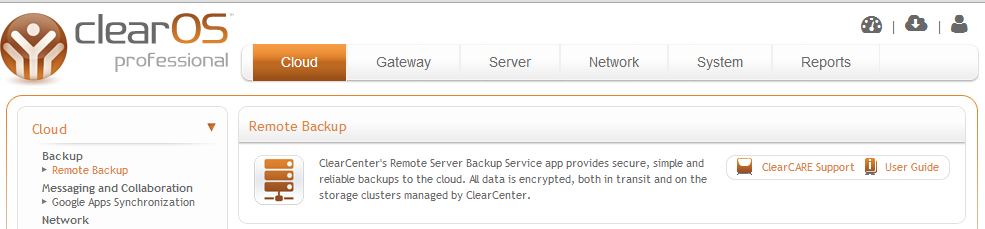
The screenshot shows options for backing up local workstations.
ClearOS offers a number of different versions and support levels. You can download and run the community edition for free, a choice that I might consider to replace a Windows SBS 2011 server if there are no processes on the server that are dependent on Windows. You can install it and run it on your own dedicated hardware. (They don’t recommend running the whole thing in a single virtual machine).
Or you can run it on a ClearOS hybrid appliance. These require the ClearOS Professional version which is a subscription-based support plan. The supported version can also be run on your own hardware. It includes certified and tested versions of all of the applications so that they are guaranteed to work together.
Years ago there was the Cobalt Qube, a single box which provided eMail, file and print services in a single cute box. (You can still find them on eBay). It was a great way to get an “instant network”, and I was sorry to see it discontinued. The ClearOS options provide a similar instant network, and would be suitable anywhere a Windows Small Business Server might be considered.
Mining the Social Web
O’Reilly recently held a 1/2 price sale for electronic versions of some of their newer books. I bit on Mining The Social Web 2nd Edition by Matthew Russell. Having just started the book, I’m not yet in a position to really comment, but I was intrigued by several aspects. Basically the book is about using the Python programming language to access social media sites through their API (application programming interface).
1. Download and install VirtualBox if you haven’t already.
2. Download and install Vagrant.
3. Establish an account on GitHub
4. Download the GitHub client. This includes two applications, the GitHub terminal, and the GitHub GUI Manager.
5. Using Git, “Clone” the GitHub directory for Mining the Social Web Second Edition. This makes a copy of the GitHub directory on your local machine.
6. Start a command line session, and CD to the MTSWSE directory (whatever you’ve named it) Run vagrant up. This starts the creation of the virtual machine, and the full provisioning. It is about a twenty minute process. And, to be sure, given all of the output that it generates, it looks as if a multi-hour job has been automated.
A couple troubleshooting tips. If Vagrant looks like it is installing “the default VM”, or if you see a reference to PROCESS32 you’ve somehow missed the GitHub part… maybe the directory is wrong? What you should expect to see instead is PROCESS64.
If correct, the provisioning process will end with a line
DEBUG: Exiting.
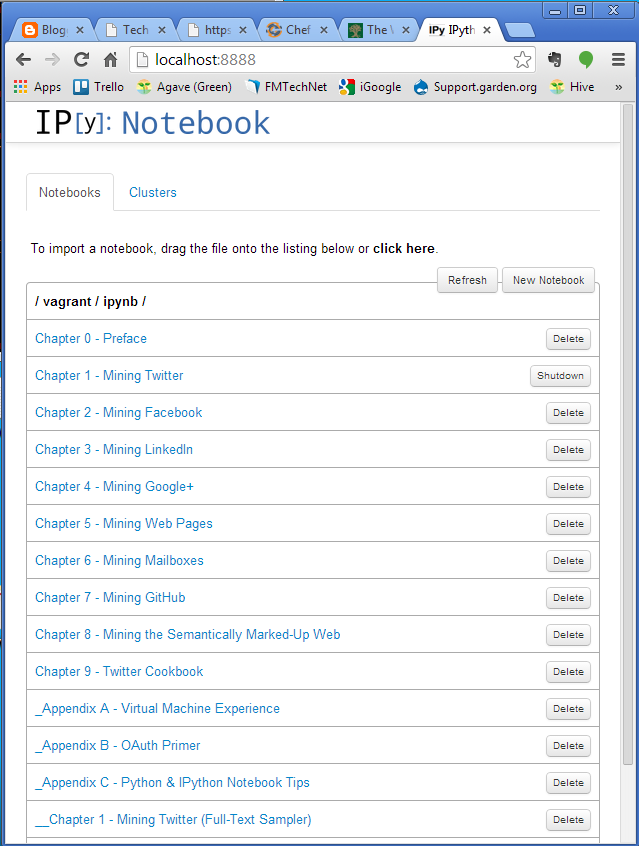
The real sign of success is to open a web browser and navigate to http://localhost:8888
That will bring up the main page of the IPython book..
My favorite error message to date:
DL is deprecated, use FIDDLE.
The Vagrant documentation refers to another program called Chef. Chef manages the provisioning of servers, and is used especially in cloud,VM and multi-server installations to manage all of the server instances.
Can’t Connect: HeidiSQL + VirtualBox + mySQL + Ubuntu
After creating a new mySQL server within an Ubuntu guest OS running on VirtualBox, (how is that for a mouthful?) I wanted to connect to the server with HeidiSQL, my toolbox of choice when dealing with basic SQL operations. I expect that I would have the same problems attempting to connect with similar client software, such as mySQL Workbench or PHPmyAdmin.
The symptoms of the problem showed up in an error message, generated by HeidiSQL:
Connect Error (2003) Can‘t connect to MySQL server on ‘192.168.219.107‘ (10061)
So, more or less in order, I did the following:
1. Create a mySQL user with an identical name and password as the Ubuntu user account. To connect to mySQL, you need to have two valid accounts: a.) a valid Linux user account, and b.) a valid mySQL user account. On Ubuntu, these need to be same….because you only get one chance to pass through a name and password when logging into a server from HeidiSQL. This is done by logging into the mySQL client on the Ubuntu box, and performing the following:
GRANT ALL PRIVILEGES ON *.* TO ‘username‘@’%’ IDENTIFIED BY ‘password‘ WITH GRANT OPTION;
Note that the both the user names and password are case-sensitive, and the mySQL user’s name and password must be identical to the ubuntu user’s name and password for Heidi to be able to log in.
Restart the machine.
sudo shutdown -r now
This reloads everything, including the mySQL daemon so that it listens on the new IP address.
That’s it. You should be able to log in with Heidi now.
Notes:
1. You could probably leave the default networking setting in place, (it is NAT), and the VM will be assigned a NAT address along the lines of 10.0.2.15. You’d still probably want to edit the mySQL file to reflect this address, and you might also want to make sure that you forward the mySQL port 3306. I just haven’t tested this, so that I can’t vouch that it will work.
2. Of course, in a production situation, you’ll want to choose a fixed IP address for the network address. This might involve your main router and firewall, so you may need to discuss this with the sys admins.
Anyway, now that I’ve actually got this thing running…I’ve got to get back to mySQL!
Tech Friday: Note from the Cranky Sysadmin
1. With VirtualBox chugging along, I’ve have developed super SysAdmin (systems administrator) powers, and created and destroyed dozens of Linux servers and desktop workstations using both Ubuntu and Red Hat operating systems.
2. It takes over an hour to format an 8 gigabyte USB thumb drive in Windows 7. A quickformat will take just a couple of seconds.
3. The Boss took a look at my old Linux books, (copyright 2002) and laughed a mirthless hollow laugh. “Those are really old books”. I said, “yes, they are, but they happen to describe your really old operating systems.”
4. The object of all of this virtual goodness is to upgrade the hardware on a currently production server that is around eight-years old. The problem is that the operating system, mySQL and PHP are equally old. Our idea was to transfer the existing production server, on to the new hardware, and then worry about upgrading, as we expect that some of the PHP will need to be rewritten. The problem is similar to the proverbial “change a tire on a car at 70 miles per hour”. To date, I’ve been working on several separate scenarios:
- Shut down the server, and do a bit-copy of the old system to the new system
- Leave the server running and do a copy to the new system over the network.
- Create a new empty server with the old versions of the OS (Redhat 7) and mySQL (3.23). Dump the mySQL data off the old server and restore to the new server.
Units = cylinders of 16065 * 512 = 8225280 bytes
/dev/hda1 * 1 191 1534176 fd Linux raid autodetect
/dev/hda2 192 1211 8193150 fd Linux raid autodetect
/dev/hda3 1212 1721 4096575 fd Linux raid autodetect
/dev/hda4 1722 4865 25254180 f Win95 Ext’d (LBA)
/dev/hda5 1722 1912 1534176 fd Linux raid autodetect
/dev/hda6 1913 1977 522081 fd Linux raid autodetect
Units = cylinders of 1008 * 512 = 516096 bytes
/dev/hdc1 * 1 3045 1534176 fd Linux raid autodetect
/dev/hdc2 3045 19301 8193150 fd Linux raid autodetect
/dev/hdc3 19301 27429 4096575 fd Linux raid autodetect
/dev/hdc4 27429 77536 25254180 f Win95 Ext’d (LBA)
/dev/hdc5 27429 30473 1534176 fd Linux raid autodetect
/dev/hdc6 30473 31509 522081 fd Linux raid autodetect
Units = cylinders of 2048 * 512 = 1048576 bytes
/dev/hdd1 1 38166 39081968 83 Linux
But Linux remains elusive. That’s where Virtualbox comes in; you can rehearse operations and try things out.