Category Archives: Uncategorized

OSX Lion from Apple – Where’s The Beef?

Apple released OSX Lion, the latest version of their computer operating system today, and I was able to download and install it without incident to my aging MacBook, (circa mid 2007). So, what is all the fuss about? Actually, I suspect that it is mostly under the hood. The user interface changes in OSX Lion, notably the addition of the Launchpad, an iPhone-like full screen which shows all applications, and Mission Control, which combines aspects of the previous OS’s Dashboard, Expose and Spaces, seem relatively minor, and you can pretty much avoid them.

Mind-Manager 9 for the Mac
Doesn’t display the “full screen” arrows in the upper-right hand corner, but otherwise seems to work fine at first glance. There have been complaints on the MM user forums about Lion compatibility. Required the installation of a new Java Virtual Machine.

Scrivner
I’m still working with the trial version of this. An update included the full-screen icon.

EverNote
Required an update. No icon for the full screen.

Parallels
The current version is Build 12094. I upgraded to this. (Version 6.0.12094). Parallels is pretty worthless on my laptop these days, as I only have 2 megabytes of RAM, which turns out to be pretty tight when attempting to run Windows 7. On the laptop, I find myself using BootCamp.

OSX Lion Server
There were rumors that the Mac OSX server software would simply be included with the Lion update. This used to cost $499. However, it is now available as a $49.00 set of applications as an add-on. I was particularly interested in the PodCast Producer application, which I think is available only through buying OSX server. This is now available in a free download of “server tools”, which, presumably, can be downloaded and installed on a workstation to manage servers on a network. Just for grins, I downloaded these, and installed, but the PodCast Producer (now actually called Podcast Composer) crashed several times when I attempted to run it.

Mac Mail
There are minor changes to Mac Mail, in how it displays by default. The default configuration displays three columns, with the left column showing mailboxes and folders as before, then a column which displays the list of eMails. A third column displays the contents of each eMail. Since I don’t like to display contents by default, and I think it is major safety hazard as it opens each eMail, I reconfigured the pgoram to turn off the third pane. So, Mail now looks about the same as before.

Calendar
There are several changes to the Calendar program, but most obviously it has a kind of faux leather “blotter” frame around the calendar days. I spent almost a half-hour searching on Google trying to figure out how to get rid of the damn thing, it looks really tacky, and worse, it doesn’t appear to be changeable.

Address Book
This now looks like a “paper” address book, with a sleazy leather “binding” which matches the calendar.

OmmWriter
No change. OmmWriter works in full screen mode anyway. Seems to work fine in Lion.

More Updates
But wait….there’s more! Running the Mac update application will fetch updates for iWeb, iTunes, iWork, and some third-party things like printer drivers.

More than you want to know
At Cult of Mac, they’ve sketched out many of the changes. They might be a little breathlessly enthusiastic. Anyway, I’m glad I upgraded, and I’ll be interested to see how it goes on my iMac.

U.S. Broadband – Not Much Progress

Oh dear. As I was poking around in my own blog looking for wisdom about Microsoft Access, what should I find but this post, entitled U.S. Loosing Edge in Broadband.

The post was from June of 2005. Yikes. Clearly, “we” haven’t made the case in the U.S. for extensive broadband. However, a recent video from PBS does a really nice job describing what is going on in other parts of the world.

Video Link at: http://www.pbs.org/wnet/need-to-know/culture/video-high-fiber/9263/

Plus the original link to the article in Foreign Affairs works fine.

The interviews, in fluent idiomatic English, by non-native speakers, were sobering.

While we in the U.S. are fighting three unnecessary wars, agonizing about how to pay for health care, fighting culture wars over things like the president’s birth certificate, and expressing outrage that we are paying one-third what Europe is paying for gasoline, other first-and second-world nations are eating our lunch in terms of preparing for the economic future in which our children and grandchildren will be living.

P.S. There is a lively discussion in the comments section on the PBS link. And they cited a Harvard study:
http://cyber.law.harvard.edu/sites/cyber.law.harvard.edu/files/Berkman_Center_Broadband_Final_Report_15Feb2010.pdf

Five Non-Profit Technology Trends for Spring 2011

Technology Trends Affecting Non-Profits: Spring 2011

1. Routine hardware costs are approaching zero. This sounds like a gross exageration, but, I just ordered a network file server for under a thousand dollars, whose equivalent cost over fourteen thousand dollars fifteen years ago. Desktop workstation computers that cost $2400  five years ago, are now under a thousand dollars, and well-equipped laptops that cost $1300 a few years ago, can be had for half that amount.  I walked through a college administration building recently. Almost all of the desks had laptop computers on them, plugged into docking stations and there  were almost no desktop computers to be seen. The latest hardware refresh for our student computers has been replacing desktop computer labs with collections of laptops. It is the beginning of end of purpose-built computer labs for that organization and a return to a more library like “learning center”, with round tables, fast wireless, and laptops.  

2. The movement toward cloud-based services, using shared hardware and software located remotely, is accelerating.  Of course, we’ve had these for many years (Hotmail), but now applications, storage, processing, and whole remote servers are available sometimes free (DropBox) or for a few bucks per month.  

3. Broadband internet is ubiquitous. Clearly, an “always-on” internet connection is required to access the cloud.

4. Social networking applications;  Twitter, Facebook, etc. are seen as viable marketing tools. The question to ask yourself here is whether your clients, constituents or customers are using these platforms. (Actually, you need to ask *them* if they are using social media)  If they are… then you should too. But if they aren’t, then you can place your priorities elsewhere.

5. Mobile applications on smartphones and tablets are booming. Some believe that the easy money has been made by the early adopters of mobile computing. What is clear, however is that later adopters are developing a strategy for deploy their applications and information to mobile devices.

As an agency head or technology manager, you might want to consider your view of these examples.  Where are you and your organization on the adoption curve?  Bleeding edge, early adapter, currently in production, not interested?  

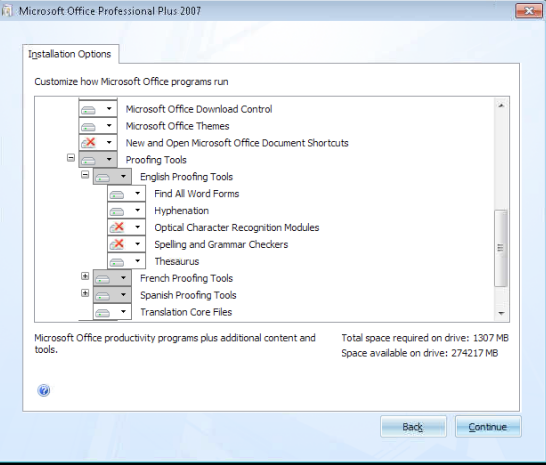
Word 2007 — The Lost Spell Checker

Problem: Microsoft Word 2007 appears to have lost its spelling and grammar checker.  


This worked for me.  

Control Panel

Add/change Programs

Microsoft Office

Office Shared Features, 

Proofing Tools

See if the English tools are grayed out.   (see attached screen shot).   Change the Spelling and Grammar Checkers to “run from this computer” .     


The State of Custom Databases on the Windows Platform

I don’t think it is my imagination. I am thinking that the state of custom database development has deteriorated. With a few exceptions, most “casual” Windows database development has been relegated to Microsoft Access, with a little FileMaker thrown in for good measure.

Microsoft abandoned their middle-tier desktop database, Visual FoxPro, back in 2004. There is still an apocryphal claim that there are more lines of xBase code (the underlying programing language for FoxPro) used in currently running applications than there are for all others except Cobol.

Microsoft still has two families of database products; Access, which comes as part of Microsoft Office Professional, and SQL-Server, which is available in a number of flavors running on individual desktop machines to providing back-end support for massive on-line databases.

Why the lamentation? I’m currently working with two NGOs, with different backgrounds and experience, have the same issues regarding their organizational data.

1. They want their data to be all one one place. Organization A. has donors, volunteers and clients, and any single person could be one or all of these things to the organization. They want to look up a person’s name and tell, on a single screen, the full “transaction” history of their relationship with the person, as well as different demographic data related to each person’s “role”. Organization B. has a similar situation, but with even more possible roles, singly or combined as well as several unique roles, including membership in one or more of over 30 committees.

2. They don’t want to learn something new. Organization A. is on its third iteration of a relationship management database. The first was custom programmed over the course of eight years in tiny increments. It was shaping up to be a pretty good information management system, before their state overlords decreed that they would have to use a web-based system imposed from the top which provided the state with outcomes data, but which left out much of the “management information” needed for the organization. They used Telosa’s donor system for awhile, and then switched to DonorPerfect with some custom modifications to accommodate tracking of volunteers. The outcomes data stays with the state’s web-based system. It goes without saying that the two systems don’t talk to each other.

Organization B. has all of its data in Outlook 2007 running on Exchange 2008. They use Outlook to generate as many mailing lists and lists for management as possible. They use a third-party eMail list service, and still keep large chunks of custom data in Excel spreadsheets. But a lot of data is in more than one place.

3. They don’t want to spend “a lot”. No, let me rephrase that. They’ve not yet been able to convince themselves that the cost of an online system is going to yield the kind of leverage and value that they believe should be is possible (and which they had already experienced in the case of Organization A). Yet, if they could be convinced that a cloud-based online system, billed per month was going to serve them adequately they might go for it. But they are also concerned about the ongoing reliability of cloud-based system, and, deep down, I think we all are still resisting the notion of paying hundreds of dollars per month to “use our own data….”, as well as being understandably sceptical of being at the mercy of the constraints of an online system. (Exhibit A. QuickBooks Online. The price isn’t unreasonable for a single user at something like $35.00 per month… but it is sloooowwww, compared with QB for Windows. Then again, QB for Windows, the desktop version, requires a $300 per year “update” for the payroll function which, as far as I can tell, basically allows you to download the payroll tables, and support drops off after the third or forth year, requiring an update of the program. Hello QuickBooks 2011.

The expenditure may in fact be similar between the desktop and cloud versions. But the sense of control is different. It is like prepaid cell phone service versus a monthly plan.

4. They tried Access. Took a bunch of classes. Trained the staff. Tried to make it all work. Forms, Queries, Datasets, Reports. Their application is really too complex for Access. (Don’t tell that to the generic pharmaceutical manufacturer a couple towns over that was at one point running their entire manufacturing line on Access.)

So, now, the situation is they want to use what they have and modify it to contain all of the data that is scattered around in spreadsheets and other systems. Our problem is to accurately assess how malleable each application is, in terms of opportunities for customization, and then, hopefully, adjust our expectations accordingly, and figure out viable options.

One thing is that I think there are ways to improve the situation, even if they are hidden from the desktop user, and incorporated into the existing applications under the covers. Like all Microsoft-based products there are a dozen different approaches, languages, and back-ends to approach the problem. The solution may even include… Access.

Ommwriter. Now available for Windows, and a bit on Flow

OmmWriter has been released for Windows. It appears to be identical to the Mac version, with an addtion of an “Export to PDF” option. OmmWriter is a text editor, nothing more, nothing less. It does not even have an option for printing. There are four font possiibilities for viewing text on the screen; a sans-serif, serif, a monospaced typewriter font and an almost unreadable script font.

There are a couple of unusual enhancements that are intended to promote concentration while writing. the first is a set of sound files which play ambient background music. One selection includes a bell and gamalan-like series of ringing sounds that you might expect to hear in a Buddist monestary.

The other innovation is visual. OmmWriter takes over the full screen of your Mac or PC, and blots out all other icons and sounds… forcing you to concentrate on writing without distraction. You can choose from a number of screen backgrounds which consist of soft grays, white or pastel blue.  Once you begin writing, within a resizable frame on the screen, the frame borders and attendent icons fade away, leaving only your text and a small horizontal cursor. If you move the mouse, then the frame reappears with a word-count at the bottom.  This makes OmmWriter an excellent medium for creative writing of any kind, including diaries, morning pages, or input for 750 words.

The best thing is that it is free to try out. The free and paid versions are identical, with the addition in the paid version of additional screen backgrounds, extra ambient sound backgrounds, and the ability to select from a variety of typing sounds. The publisher allows you to pay what ever you like, but suggests that it should end in 11, an amount which supposedly has cosmic significance.

After using the program on the Mac for several months, I have to say, I think this is one of the more pleasurable instances where my work has been improved by software (of all things!). Not only have I written a great deal more, I enjoy and I look forward to the process of writing. Without the distraction of dozens of icons, controls, wizards, options and ribbons, I find that I can concentrate better and achieve that elusive state of Flow.

What would an equivalent spreadsheet program might look like?  How much can you take away and still have a functional and useful spreadsheet program? You could remove more than you might think. You need columns and rows, of course, and the ability to put in formulas and totals. Everything after this is probably extra functionality. Indeed there is anecdotal evidence that people use about 20% of the functionality of most software.

Poking around to find more about Flow,  the WikiPedia entry lists ten attributes of Flow:

  1. Clear goals (expectations and rules are discernible and goals are attainable and align appropriately with one’s skill set and abilities). Moreover, the challenge level and skill level should both be high.
  2. Concentrating, a high degree of concentration on a limited field of attention (a person engaged in the activity will have the opportunity to focus and to delve deeply into it).
  3. A loss of the feeling of self-consciousness, the merging of action and awareness.
  4. Distorted sense of time, one’s subjective experience of time is altered.
  5. Direct and immediate feedback (successes and failures in the course of the activity are apparent, so that behavior can be adjusted as needed).
  6. Balance between ability level and challenge (the activity is neither too easy nor too difficult).
  7. A sense of personal control over the situation or activity.
  8. The activity is intrinsically rewarding, so there is an effortlessness of action.
  9. A lack of awareness of bodily needs (to the extent that one can reach a point of great hunger or fatigue without realizing it)
  10. Absorption into the activity, narrowing of the focus of awareness down to the activity itself, action awareness merging.

Not all are needed for flow to be experienced.

If you believe in the concept of Flow, and have experienced it,  it is sobering to look at the ten items and ask, how often within our current educational system and our workplaces is it possible to experience some of the Flow attributes?

Chron This Week: Save $176,000 by revamping IT

This week, The Chronicle of Philanthropy has a technology supplement section that has some very interesting articles this time.

The most provocative article is entitled “How a Small Nonprofit Made Simple Tech Tweaks and Saved $176,000.”

Well, one thing they did was reduce their staff from 10 to 4, so I can imagine that made a considerable difference in what they might have been spending, even before they made changes in their IT infrastructure. The staff reduction included the IT staff which they estimated cost them $10,000 a month.

But there are some intriguing technical ideas:

  • They dumped their existing file server for a virtual server hosted by Egnyte for $50.00 per month.
  • They changed their applications to Google Apps, which they estimate will cost them $400.00 per year. They estimated that their file server, backup capability and tech support contract for these items previously cost $3500 per month. (Wow!)
  • They estimate that they save $250 per month in electricity for the file server.
  • They estimate that they reduced their internet and telephone calls from $365 per month, via Comcast, to $55 for Comcast Internet service, and then $45 per month for internet phone service by TokTuMi for 4 users.
  • They changed from dedicated 4-user QuickBooks, to an online version of Quickbooks at $35.00 per month.
  • They said their web server was costing them $1030 per month, for a dedicated server at a hosted data center. This was changed to $500 per year for a hosted content-mangement system.

There are other changes in the article, including a conversion of their donor management system to Salesforce, and their credit card processor to Paypal.

Some of the arithmetic seems odd. Does a single file server really cost $250 a month in electricity? Assuming an average of 200 watts of power consumption  (My new Dell PowerEdge 110 with 4 hard drives is currently humming along at 93 watts as shown on the Watts-Up meter) …

30 days, times 24 hours is 720 hours.
720 hours times 200 watts is 144000 watt hours, or 144KWh
A kilowatt costs about 12 cents in our neck of the woods.
144 times .12 = $17.28

The change for the hosted web server certainly makes sense. I also agree that the expense, maintenance and aggravation of hosting eMail on your own server seems to be high, instead of having this dealt with by a remote eMail provider. On-line Quickbooks? I’m not sure; my one experience with the online QB was less than satisfying, and most bookkeepers that I know seem to prefer the standard Windows version hosted locally.

What is significant in the article is that it is an excellent example of how people re-think their business practices. Hopefully the changes will promote increased productivity and convenience, in addition to showing significant cost savings.

Check out the article.  What changes could you make in your IT infrastructure?

Mid-winter in Vermont means any number of things, including spring skiing, the threshold of mud season, maple sugaring and initiatives in the state legislature. Our legislators have few support staff, and they depend on their constituants to help shape legislation and the state budget. One way for non-profits to help their own members help their legislators is to issue eMail “action alerts”, which provide all of the information needed for the member to take a position on a particular issue. I had a good one today from Local Motion, a transportation advocacy organization that supports walking and bicycling.

Dear Local Motion Members:

Your help is needed to pass H.198, the Complete Streets bill, which would change Vermont transportation policy to ensure that the needs of all users – pedestrians, bicyclists, transit riders, and older drivers – are considered and accommodated in state and locally managed transportation projects. Complete streets provide safe, accessible ways to get around, help young and old be physically active, reduce greenhouse gas emissions, and save on gas bills.Legislators are home this week for Town Meeting Day, and now is an important time to contact them about Complete Streets. We need your help to make sure Complete Streets is a priority for action in the House Transportation Committee.  Please contact members of this committee by mail, email or phone and ask them to support the bill.  If your legislator is not on the Transportation Committee, they need to hear from you too!

Click here for fact sheets and talking points (link)

Click here for a list of Transportation Committee members (link)

More information is at: http://www.localmotion.org.  Thank you for all your support for active transportation and recreation!

Signed (name of the executive director) Local Motion, Executive Director

organization address
web site
email address

Local Motion is a non-profit organization promoting active transportation and recreation for healthy and sustainable Vermont communities.

Get out and get active this winter — at the Intervale Ski Trail or Great Ice in Grand Isle!

The beauty of this eMail is that Local Motion has now given me all of the tools that I need to contact my own representatives in the House and Senate with a position.
1. A short paragraph describing the bill, with a bill number.
2. A call to action.  “Do XYZ”.
3. Links to a fact sheet
4. Links to talking points
5. Links to a list of legislators.
6. Contact  information for the organization
7. A tag line suggesting a relative activity sponsored by the organization.

This gives me everything I need to spend fifteen to thirty minutes or so to create an eMail message to send to my legislators. What’s not to like about that?

Our legislators tell us  that for every one person who contacts them via eMail or phone message, they estimate a minimum of ten other constituants feel the same way. Such contacts are effective. If a legislator receives 100 messages about Bill X, and 10 about Bill Y, then they begin to get a sense of where they might focus their priorities for this particular legislative session.

This kind of personal constituant contact is much more effective than “email blasts” from advocacy groups or contact with lobbyists.  State politics are a contact sport. It can be fun and individuals really can influence the outcome of a legislative session.

4-H Robotics with Lego Mindstorms After School

The CasterBot

This week we’ll be completing the second of two after-school programs using the 4-H robotics kits and curriculum. I’ve been working with a group of eight middle-school students, grades six and seven. The kids are divided into teams of two. Each team has a Lego Mindstorms 2.0 Robotics kit. The kits were provided by the 4-H as part of their extensive technical curricula. This has been a great learning experience, and not just for the kids.  

1. Most kids like building the robots. Those with Lego experience will have a leg up on those who haven’t built with Lego. As with any building set, there is a plethora of a tiny pieces; over 600 are included in the stock Mindstorms set.  Managing these can be a challenge. The “retail” Mindstorms set doesn’t come with any kind of box to separate everything.  I went to our local crafts store to get boxes with divided compartments to store the smallest pieces.

2. Most middle-school kids have never programmed before, so that will be a new experience. The NXT-G programming environment is a graphic environment that allows the programmer to connect “blocks” of functionality.  It is a derivation of LabView from National Instruments.  The software is surprisingly slow and buggy on Windows, and in my experience, useless on the Macintosh.  It works much better on a desktop computer rather than a laptop, let alone a netbook as a large screen is helpful.

3.  Mindstorms comes in a several different flavors. The retail version for Mindstorms 2.0 was released in 2008.  There is an educational version which requires purchase of the software separately for another $79.00. This includes (maddeningly) a few different parts from the retail version, as well as a couple of enhancements, including a lithium battery pack to replace the six AA batteries, and (hooray!) a set of trays for all of the parts. If I had my choice, I’d go with the educational version.

4. There is a fair amount of information, curricula, lesson plans and so on available in print and on the web. Much of this is directed toward a specific version, so if you want to build a project designed for the education version, and you have the retail version, you will need to modify the project, or buy extra Lego pieces. The original 4-H curriculum was based on an older version of Mindstorms, so I ended up assembling my own curriculum from bits and pieces that I found on the web.

5. We delivered our after-school program as six ninety-minute sessions.  We started with a discussion of the previous week’s work, and an introduction to the current week’s work. The kids worked in teams of two for about 55 minutes, and we left 5-10 minutes at the end of the session for cleaning up and organizing the kits.

6. Participants will have gaps in age and experience, and some kids will be slower than other kids, of course. My way around this was to have extra “bonus” challenges ready for the fast kids, so if they finished the weekly challenge, they would have something to work on. This is an issue in the first two weeks, however as they have gotten the hang of programming, they are happy working on their programs, so they don’t need the bonus challenges.

7. There is considerable preparation involved. Even though I had lots of lesson plans to choose from, I ended up making my own. For the after-school program I estimate that I’ve spent at least a hundred hours in preparation and delivery. The 90 minute delivery blocks are a relatively small proportion of the total.  I think this may be one reason why there are not more similar programs in the schools; it takes an awful lot of time to prepare. Many parents and educators might expect this type of hands-on work to be delivered during the course of the normal school day as part of a math or science class.  I think such programs may remain rare as they would require a substantial revamping of the school curriculum to accommodate longer class sessions, longer prep and set-up times, and a special emphasis on STEM (Science, Engineering, Math, and Technology) in our public schools. Still, even as an after-school program, it may help spark some kid’s interest in going further with math and science.

8. Typical start-up costs for a similar program might be around $4,800.  This would include $1200 for the Mindstorms kits, $2,800 for laptops (if computers are otherwise not available), and $800 for miscellaneous Lego pieces to augment and replace parts in the kits, as well as provide for paper, printing, travel, name tags, etc.  Assuming volunteer faculty are available running the program after the startup costs would only be a few hundred dollars, at most.  In my nefarious long term scheme, I’d like to get Rotary Clubs or other service organizations to adopt a local school and fund the start-up costs, and perhaps even deliver the program.