Tag Archives: http://schemas.google.com/blogger/2008/kind#post

Ten Hints for the Grant Writing Process 1-4

1. Plan the application process. Work backwards a month or more from the final deadline, so that there is time to circulate the final version of the application among friends and critics. Don’t try to submit the application to Grants.Gov on the due date. If there are any technical problems and you are delayed, you could miss the deadline. They will not show mercy in this situation.

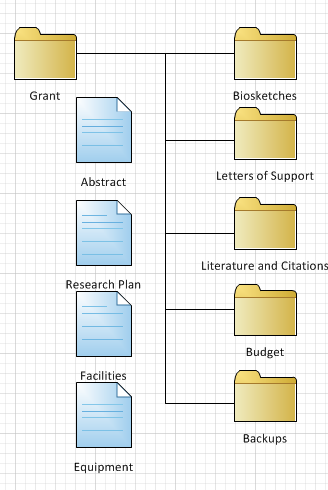
Grant Application Folders

2. The SBIR application process requires the assembly of several dozen separate documents. Have a plan and a place for how these are going to be stored, and how you will handle revisions, i.e. you need to establish a folder structure. You don’t want to be choosing between conflicting versions as you are assembling things, or finding out later that you submitted the wrong version in the final application. You want confidently identify the most current version of any component document. 

3. Have your .PDF software and hardware up and running, and be confident that it works. The classic products are from Adobe, but there are other alternatives. PaperPort 12 Professional (Windows only) includes a virtual PDF printer “driver” which allows you to “print to PDF”.

4. Gather all the bits and pieces that you may need and have them handy. I use Evernote for this kind of thing or, on Windows,  Microsoft OneNote. Examples of things I want on hand (and have wasted time searching for in the past, because I was simply being sloppy…)

  • Login Names and Passwords for Grants.Gov and the NIH Commons (for NIH applications) There may be multiples of these for different “roles”, i.e. grant applicant, signing official, etc.
  • Central Contract Registry login name and password
  • Your state congressional district code. Mine is VT-001. It has changed three times in the past couple of years, and it took me an hour to find out what it was in its latest form acceptable to the on-line system.
  • Federal-Wide-Approval number, and IRB number if you are involved with research with human subjects. 
  • Names and contact information of all collaborators. 
  • Your Dunn and Bradstreet number (DUNS). Also, the DUNS for any collaborator who is getting a piece of your awarded grant. 

4. Figure out how you are going to share documents as they are developed. GoogleDocs, Dropbox, and BaseCamp are examples of applications which allow you to share documents over the internet, and access those documents from several computers. Some kind of threaded conversation software may be helpful, provided by a wiki, SharePoint, or BaseCamp.

More at: Grantwriters Toolbox. More about letters of support.

Grantwriting: Letters of Support

Letters of Support


Who Contributes Letters of Support?

Letters of support are used to strengthen a grant application. These typically come from three kinds of supporters; collaborators, constituents, or outside endorsers. Collaborators add credibility to a grant application, and most, if not all funders prefer to see evidence of collaboration, and saving of duplication and overlap.


Collaborators

Collaborators are those who are participating in the project with you. Their letters of support should include sufficient information so that the funder will be aware of the collaborator’s participation and allow the funder to evaluate the collaborator’s contribution to the project. Letters from collaborators should include the following:


Description of the nature of the collaboration


Non-financial contributions to project if applicable. Such contributions could include:

• Expertise

• Deliverables, i.e. products, reports, evaluation services, etc.

• Personnel

• Resources


Financial Contributions if applicable. These may include

• Cash

• In-kind contributions (non- monetary services, to which a cost may be attached.)

• Matching funds


Financial Arrangements

If the collaborator is receiving a piece of the grant funding, then this should also be spelled out in the letter.

Include expected outcomes, results, and value resulting from the collaboration.

State what the benefits will be from the collaboration. Use numbers and examples.

Outside Endorsers

Outside Endorsers are people who no direct participation in execution of the project, but who do have a stake the project’s outcome . Outside Endorsers add credibility and weight your application.

Typical Outside Endorsers

• Colleagues in the field

• Others who have funded your work

• Politicians, Government Agencies familiar with your work


Letters need to make clear:

• Relationship between your agency and endorser

• Value and results obtained or demonstrated


Examples:

• A youth services agency endorses a project run by a trade association designed to create apprenticeships in a particular technical field. The youth agency might not be directly involved in the project, but it might make the point that the youth agencyʼs clients would benefit from an apprenticeship program, The youth agencyʼs letter might also contribute background statistics on demographics and need for opportunities for out-of-school youth not planning to go to college.


• A local development corporation endorses the same project, citing statistics about the loss of jobs in the local county, and the need for positioning the local work force to take advantage of newly emerging business opportunities in renewable energy.


Constituents

Letters from constituents and beneficiaries benefit from concrete facts and figures for the current grant

application. Individual stories are very powerful. Any letter with specific outcomes will be more powerful

than one citing generalities.


For example, a student in an adult learning program might include statements such as:


Before coming to The Learning Center, I was reading at a third-grade level. I worked with teachers and volunteers at TLC for two years, and was able to raise my reading level to sixth grade”. After working as a laborer for seven years, I have entered a two year apprenticeship program for electricians, and expect to graduate as a licensed journeyman electrician in May of this year.

Since such testimonials may be used across several applications, be sure that they up-to-date A fresh

copy of a letter with a current date and signature will be evidence of current support and relevance.


Constituent Letter Components:

Constituent letters should include:

• Background of the constituent

• Relationship with your agency

• How the constituent benefited.


Example Benefits

Constituent letters provide third-party evidence of your efficacy as an agency, any statistics cited will

provide additional credibility. Numbers rule! For example:


• Home-healthcare: Number of home-health care patients served, compared with last year. How many

home healthcare nurses and aids participated? What is the ratio of nurses to patients? Are total costs

and cost per patient going up or down? How many patients were served at home as opposed to nursing

homes?


• Number of jobs created. Number of new companies created. Number companies declaring bankruptcy

or moving out of the area. Net gain or loss of jobs? Type and quality of jobs; Average salary

and benefits. Number of jobs upgraded or saved.


• Land Conservation: Acres of land conserved. Numbers of conservation easements,


General Guidelines for Letters of Support

Introduce yourself. Include a description and qualifications of the letter writer.

Addressee should be either the funder or your agency

Include a sentence about the experience or history with your agency, if available

Specifically cite the solicitation number and solicitation title if these exist. Many funders are fielding applications

for multiple programs.

One or two paragraphs of text in the body of the letter

Use specifics; numbers, timelines, outcomes.

Specify expected outcomes (with numbers) of your relationship with the funder.


Format

• No more than one page in length

• Letter should be on the contributorʼs own letterhead

• Include a written signature and title of an official of the contributorʼs agency or company

• Submit as a .PDF file and and/or hard copy


Regarding the last point; most grant applications these days are submitted electronically. At least some of the narrative components will include longer discussions created within a word-processor (Microsoft Word for example) and then exported to an Adobe .PDF file. The .PDF files are then either uploaded individually to the grantmakerʼs web site, or the files may be combined into a single long .PDF which is uploaded or sent as an eMail attachment. Because of the logistics involved, it makes sense to try to get letters of support early on, and if you canʼt get .PDF files from letter providers, you need to be able to either convert the files they send you to .PDF yourself, or use a scanner to create a .PDF from a hard copy. Donʼt beat up your letter providers if they canʼt give you a .PDF. Make sure you have the tools in place to do the conversions if needed.


Timing


Outside Endorsers

Outside endorsers can be solicited early in the grant application process; as soon as you have a solid program abstract available to enclose in your request for the letter. You’ll need the abstract so that they know what they are endorsing. The abstract also may prompt them to contribute additional ideas for developing a strong application. “You really should go and talk to …. “


Collaborators

Collaborators should include a general description of the financial arrangements and commitments in their letters of support. Solicit letters from collaborators after the budget and program plan have been defined and you have a working agreement in place.


Constituents

Constituent letters are usually less time sensitive, because the background material in these deals with things that have already happened. However it is wise not to wait until the last minute, especially if you think you might have .PDF formatting and conversion issues.
Rosetta Stone Language Learning Software

You’ve probably seen the silly ads in those upscale magazines… “she was an Italian supermodel, he was a farm boy from Omaha”… or something similar. Very weird ad campaign, perhaps, but the consensus among many foreign language educators, and teachers of English for speakers of other languages (ESOL) is that Rosetta Stone is a powerful program for teaching a second (third, fourth… ) language.

One of my clients, a provider of literacy and workforce development education has been happily using the standalone version of Rosetta Stone for some years. A couple years ago they somehow got talked into buying a network version which requires installation on a network server, and some hours of configuration and installation. This was probably not a good choice for them; they don’t really have the wherewithal or the need for this. After several weeks of phone calls and eMails attempting to exchange the licenses for single-user copies, we gave up and are now attempting to install the network version. (To be fair, their exchange policy states that there is a 180 day period after purchase in which to return their products…and we’re actually attempting this project 18 months or more after they purchased the program).

Rosetta Stone is available in several different configurations, including an online subscription which can be used via a web browser. Either this or single user copies would have been ideal. Instead, what they were sold appears to be the Rosetta Stone Enterprise version which includes a management server which tracks student progress.

One ironic twist is that this network edition includes the open source MySQL database and the Apache web server. Yet the Rosetta Stone server requires a Windows machine to run. So, instead of the server running under Linux, you have to have some kind of Windows box to host the server applications. The server installer then installs MySQL and Apache for Windows running as services and also installs Ruby. The server requires a static IP.

This was not something we wanted on our organization administration file server which is a a Windows 2003 Server. Hence the Dell T105 mentioned previously, running Windows XP.

Once the server applications are installed, you install the languages. In our case we have three levels of English, each on a its own CD. There is an installation program which prompts for the language CDs, and then gives you the option to activate them.

Activation is rather like activating Windows over the internet. For each language/level you’ve purchased, you can have one student running the program at a time. The license keys are similar to windows…. four groups of six letters and numbers. If you have already activated a language license elsewhere, then activation will fail…you have to go back to the computer on which you originally performed the activation, and “remove a language”. How this would be resolved if a hard drive had crashed or the computer was otherwise unavailable, I’m not sure.

The Rosetta Stone Manager is the management interface that allows managers to create user accounts for Rosetta Stone. This program is installed separatly from the server and is available in a Windows or a Mac version. The Mac version appeared to work OK, even on Snow Leopard.

Before going further, I called Rosetta Stone Tech support to inquire about updates. I figured that since the software was 2 years old, they probably had updated it within that time and there were no obvious links in the screens to obtain updates. Oh, yes… they would send new disks, and I need to do a complete reinstall. (Sigh), another three hours out the window. As Jerry Pournelle says….”we do these things so you don’t have to”.

After preparing the server. and adding myself as a user, I then attempted to install the workstation version of the software onto my Vista machine. This runs an Installshield installation. It worked great on an XP box. I was able to log in to the account that I set up in the Rosetta Stone server, and run the program. Seemed to work fine in a Vista session on my Mac with Parallels.

There is also a native Mac installer; this seemed unusual as I don’t recall ANY Mac software, no matter how complex, which actually requires an installation process on the Mac other than copying the application file to the Apps folder. This installer, “powered by Vise X” so far seems to be doing a search of all my hard drives. Once it does the search however, it then installs over 2000 files (!) including a Flash Player and a ton of JPG and Gif graphics files. Still, the application came up fine.

So, we’ve now got Rosetta Stone running on a Mac machine, a Vista virtual machine within Parallels on the Mac, and on an XP machine. I’m feeling confident enough to bring the server in tomorrow for a trial run.

Grantwriting 101

Two resources for grantwriting:

The Grantwriting Manual published by Coconino Community College is an excellent introduction for grantwriting. There are some excellent tips about running a grant after you’ve received the award.

Successful Grant WritingStrategies for Health and Human Service Professionals is now in a third edition.

Grantsmanship Training: Buffalo, NY


The Grantsmanship Center’s signature Grantsmanship Training Program
is coming to Buffalo, New York, September 21-25, 2009.

The program will be hosted by
The Salvation Army.

About the training
· · · · · · · · · · · · · · · · · · · · · · · · · · · · · · · · · · ·
The Grantsmanship Training Program is a comprehensive, hands-on workshop that covers the complete grant development process, from researching funding sources to writing and reviewing grant proposals. More than 110,000 nonprofit and government personnel have attended this fast-paced, five-day workshop, which is followed with a full year of membership support services.

What will you learn
· · · · · · · · · · · · · · · · · · · · · · · · · · · · · · · · · · ·
During the workshop, participants learn The Grantsmanship Center’s proposal-writing format, the most widely used in the world. In addition to practicing advanced techniques for pursuing government, foundation, and corporate grants, participants work in small teams to develop and then review real grant proposals.

Participants exit the class equipped with new skills, new professional connections, and follow-up services for one year, including professional proposal review, access to The Grantsmanship Center’s exclusive online funding databases, and an array of other benefits. Many also leave with proposals that are ready to polish and submit.

How to attend
· · · · · · · · · · · · · · · · · · · · · · · · · · · · · · · · · · ·
Tuition for the Grantsmanship Training Program is $895 ($845 for each additional registrant from the same organization).

To ensure personalized attention, class size is limited to 30 participants. For more information, click here. To register online, or to learn about scholarship opportunities for qualifying organizations, click here. Or call The Grantsmanship Center’s Registrar at (800) 421-9512 (outside California). Within California, call (213) 482-9860.

New Life for Old Computers? – Xubuntu

Wired has an article this morning about Google’s Chrome OS, a downloadable operating system that runs especially well on netbooks, and takes advantage of an always-on internet connection. (You can still work offline using Google Gears, the browser extension that caches things like GMail, and allows you to sync back up when you connect again). And, oh yes, under the covers, Chrome OS is (yet) another version of Linux.

For something a little more conventional, and that is available now, how about Xubuntu, a version of Ubuntu Linux that uses a “low-footprint” windows manager, to create a graphical user interface that works acceptably on older, slower computers?

Xubuntu retains many of the virtues of its parent, Ubuntu, while providing snappy performance on an older machine.

Xubuntu provides the usual tool kit. If you use a browser-based eMail system (gMail, Horde, RoundCube,) you can access it easily from within FireFox. For word-processing Xubuntu includes AbiWord, a Word clone which will save in a host of different file formats including the typical Word .doc and .docx formats. For a spreadsheet they include Gnumeric, which is a pretty good Excel clone. Both AbiWord and Gnumeric have virtually all of the functionality of pre-2007 versions of the Microsoft Office applications. Both of these seem to work well within tight memory constraints.

I’m trying to convince my education clients that Xubuntu is a viable way to get some additional life out of some of their older machines. The scenario has happened a couple times now… something has gone wrong with the original Windows installation, i.e. the boot record, or the registry has gotten messed up, or the hard drive has failed completely. In any case, a reformat of the hard disk is required. The problem is the cost; by reformatting the hard disk, installing the base version of the original Windows that was on the machine (which is definitely obsolete….Windows 2000, Windows ME or Windows NT,), then installing all the hardware drivers for the network card, sound card, and video that are peculiar to the machine, and then tracking down all of the applications….well, this all will take 3 or more hours. Say, $300 or so. Even then, having gotten it back up and running we’ve spent that amount on a 5-8 year old machine that is essentially obsolete. So, the Xubuntu solution is attractive… if the hard drive still works, you can go back to a working machine in about 15 minutes of a mostly automated installation.

I dunno….look at the screen shot…. it looks close enough for me.

Email Transition: Verizon to Fairpoint

All of a sudden I’ve lost eMail contact with lots of friends who had verizon.net eMail accounts as Verizon abandons their landlines in three New England States, and Fairpoint takes over.

There is an official site provided by Fairpoint which will help people transition… but it is for Windows only. The site checks to see what your browser and operating system are, and if you have Windows XP or Vista, and are using Outlook 2000 or later, you can download a little program (ActiveX control) which will change your settings.

If you don’t use Internet Explorer, the automatic setting won’t work. The manual instructions are on the next page of the web site. I had a friend go through this with a technician, and this is what he came up with.

User or Account Name:
Your new myfairpoint.net email address
Example: ([myusername]@myfairpoint.net)

POP Server: mail.myfairpoint.net (i.e. incoming mail)
SMTP Server: mail.myfairpoint.net (outgoing mail)

Account name – on incoming mail server
[myusename].myfairpoint.net

Check My Server Requires Authentication
Settings next to it. “Use Same Settings as Incoming Server”

The technician also suggested that you change the outgoing mail port change from 25 to 1025 (WTF?)

I do have Fairpoint phone mail, and this no longer picks up when I’m on the line. Sigh.

If you have anything non-windows, and non-IE (Linux, Macintosh, Safari, FireFox) , you have to use the manual instructions.

Tech Friday: Small Business Network

In a recent column  Jerry Pournelle talks about problems with the Microsoft Active Directory.  

Back in 1999 I set up the Chaosmanor domain with Active Directory on two machines running Windows 2000 Server. I knew at the time that I didn’t need that complex a network, but a number of my readers did. In those days networking was hard, Active Directory was new, and many of my associates were curious about how well it would work. At worst this was another of those silly things I do so you won’t have to.

Actually, it worked pretty well. Windows Server 2000 with Active Directory had some infuriating requirements, and it really wanted everything done precisely its way, but from 1999 until this year it served me well. When Windows Server 2003 came out I was tempted to upgrade to that, but there was never any powerful reason to do so, and as time passed it seemed less attractive. I had novels to write and other work to do. I was able to try several Linux-based on-line backup systems – Mirra was one of them – and those worked just fine. Of course machines were getting better, and my old servers were getting more obsolete each year.

Now he thinks that everything he knew about networking is wrong. In particular, like many of us, his experience carried over from older versions of Windows networking, which makes things a lot more complicated than they need to be these days. You can reads more about workgroups, domains and routers and alternatives to Windows networking in the column.

At Microdesign we are reevaluating our own network, that has a core server running Windows 2003 Small Business Server; i.e. relatively unchanged for the past five years. Nothing has really changed as far as our core requirements are concerned, except there are several of us working from different offices, and on occasion when traveling. We increasingly collaborate on projects with partners who are outside our company. Our requirements parallel many small businesses and non-profits with 2-50 computer users. Here are our “legacy” requirements:

  1. Common file sharing area where multiple users/machines can access the same document
  2. Absolute trustworthy security of those files
  3. eMail and calender – available from anywhere on multiple devices
  4. Shared printing, from multiple machines to single printers.
  5. Reliable backup 

Those modest requirements suggest a file and print server based in the office, connected permanently to the internet, with printers shared off of the file server, and some kind of backup scheme (tape or additional hard drive). The network diagram which fulfills these requirements is essentially unchanged from the 1990’s.

Even with a server-centric network our advice to clients has always been to use the facilities of an internet service provider for two applications; eMail and the outward-facing (public) web server for the organization.  We (still) recommend having eMail outside the organization to provide greater reliability, ubiquitous access via the web, and industrial-strength spam control. We recommend the organization’s public web site be hosted outside the organization to provide 99.99% uptime, and to take advantage of higher bandwidth typically provided by an hosted provider. 

So, what has changed? Two things; disk storage and broadband. Broadband, or rather cheap broadband, has made it possible to reconfigure things so that the cloud  can now substitute or supplement a file server. With individual personal computers routinely having disk drives of 250 gigabytes or larger, the original justification for “server as giant hard disk” is falling away. 
Along with hardware improvements, there are now a host of inexpensive applications available on the internet that can supplement or replace software that used to require a file server. Basecamp is one example that can be used for project management and shared file storage. 

A more modern interpretation of the legacy network diagram puts the cloud at the center of the network.

So, I’m wondering whether to replace my file server. The server is no longer the be-all end-all of my network. Like Jerry, I don’t need a domain login mechanism. I barely use my printers, and those are attached directly to the local network. The small business server’s eMail, and web hosting have always been done off-site. The server does offer SharePoint, which is a capable platform for Basecamp-like project management, but Basecamp is about $12.00 per month, and it took about five minutes to set up. And, now that we have been invaded by the Macintosh monster…there are more reasons to find, (or at least evaluate) a cross-platform solution for our application needs.

NIH SBIR Grant Application Map

NIH has deadlines three times each year, and we finished an application for the December 5th deadline. Below is a mind-map that shows many of the components required for the application. The section on the left, “Online Proposal Preparation” is a one-time set up sequence, however, you should figure that you need 60 days before the deadline to complete those steps. There is nothing to preclude working on other parts of the application while you are waiting to get set up in the Central Contracting Registry. Click on the image it view it full scale. 

Most of the sections on the right require creating Adobe .PDF files. We created these in Word 2007 (saving the files as .doc files), which was our working environment, not least because we used the EndNote add-in to for footnotes and literature citations.