Over at the Non Profit Times there is a quick article entitled “Pulling a Grant Proposal Together“. Lots of articles and tips are on the site, most are in the form of short articles and bullet lists.
Category Archives: Uncategorized
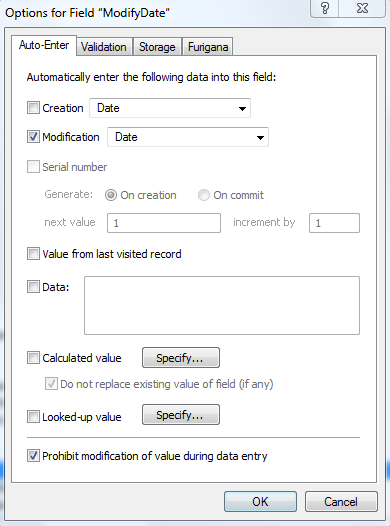
FileMaker 12: Show who created and modified a record, and when.
I had a client ask for a modification of their data entry screen to display the date that a record was created and by whom, as well as the date the record was modified, and by whom.
NY Times & Apple: Device Restrictions for Reading
I recently gave back my corporate iPad and was trying to access my NY Times digital subscription on my iPod touch…. but as I understand it, the subscription covers either the iPad or or the iPod but not both (WTF?).
I also found out that I can’t access my bought and paid-for iBooks on my Mac. (although I can still attempt to read them on the Touch).
I think this is a terrible design flaw.
I’m really going off digital reading, not that I was ever that enthusiastic. I can say with confidence I never completed a whole novel or non-fiction book that I started on the iPad.
Apple restrictions that don’t allow iBooks to be read on OSX devices (Mac computers!), and the New York Times policy of restricting content to particular devices is counterproductive.
At least Amazon with their Kindle apps allow books to be read across all my devices. Amazon titles tend to be either equivalent in cost, or even cheaper than the iBook version.
Microsoft Overload #2234255
The Parable of The Infrastructure
Once upon a time there was an Empire that decided it would embark on a huge public project to tie together all its far-flung lands. The connections that were intended to knit the empire together, to foster economic opportunities, and to allow its citizens to travel, communicate and exchange goods and services.
Smaller areas adjacent to the main arteries of the project were asked to join, These areas were also afforded the option to be bypassed. Many chose this latter option, in the name of preserving their local integrity, of maintaining their local mores, or out of distrust of the Empire.
A generation passed. One area, known as “Bolton”, was located within a scenic mountain range. The town of Bolton welcomed a local scheme to develop a ski area within its borders. Half of their mountain range was cut with ski trails. In the end, they had a lovely recreational opportunity. The citizens of Bolton anticipated a huge influx of tourists to their ski area and looked forward to growing rich. But the tourists never came. They were seen whizzing by in their SUVs along the new infrastructure which Bolton had declined a generation earlier, on their way to other ski areas. “If only we had made sure that we got that Bolton exit off the Interstate”, they lamented.
The ski area went bankrupt and closed. Another person bought it and ran it for a few years before going bankrupt again. A third company bought the ski area and ran it for several years before it went bankrupt again; and in the process millions of dollars were lost.
Another generation has passed. And Bolton doesn’t have an exit off the Interstate, and the Bolton Valley ski area has another owner. They are still waiting for the skiers.
Moral
=====
Some infrastructure opportunities come once in a a couple of generations and if you miss the window of opportunity you may never catch up.
Rural Electrification, Interstate highways, Broadband Fiber.
10 Rules for Non-profit Network Management
Mac OSX: Missing "Save As" Considered Harmful
OSX Lion, and iWorks, the latest version of the Mac operating system and office productivity suite introduced a bone-headed new idea of “automatic saving”, and eliminates the option of “Save As” in several applications, notable the Mac word processor, Pages.
Forgive me if I seem unadaptable in my old age, but consider the steps required to create a new version of a familiar document.
The old way:
1. Open the document you want to duplicate
2. Select File->Save As
3. Save the file under a new name,
4. Revise and save.
Among other things, the clear four-step process ensures that you don’t write over an existing version of a document. I do this all the time.
Now, consider the new way.
1. Open the document you want to duplicate
2. Select File->Duplicate
This opens a new version of the document with the same file name with the word “copy” appended to the original file name.
3. Switch back to the original document and close it.
4. Switch to the copy.
5. Select file->Save… (since the copy has yet to be saved, the menu option has changed from “Save a Version” to “Save”.
6. Rename the duplicate file to something useful, i.e. remove “copy” that the program appends to the file name, and make changes.
7. Select “Save” at the bottom of the dialog
8. Begin making revisions. The program automatically saves periodically.
THIS IS INSANE. Who made this up? And are they still working at Apple?
Update: August 2012: The successor to Lion… (Mountain Lion), has partially restored Save As…. if you hold down the Option key, when displaying the File Menu….. its back! Or if you are a keyboard shortcut person, the keyboard combination of Shift+Option+Command+S will Save As. (That takes two hands, for me).
Still, since the earlier change still seems incredibly stupid, I can’t quite understand why they don’t reverse it and make Save As the default, and then evaluate whether anyone uses the Duplicate command…which takes so many additional steps.
New FileMaker v. 12 with free iOS runtimes
FileMaker has announced their version 12 upgrade to the popular cross-platform desktop database. The biggest news is that that the iPad and iPhone runtime versions, which used to cost $40.00 and $20.00 respectively, per device are now free on the Apple App Store. This is terrific, and will hopefully popularize FileMaker further on those platforms.
The .fp7 file format has been retired in favor of a new format. Fp7 files are moved into the new format in a one-way scenario….once changed they can no longer be opened in older versions.
I worked with the pre-release version of FM 12 and found most changes to be relatively minor. I had no problem converting older apps to the newer format. Everything worked in all formats and platforms; Windows, Mac OSX, iPad and iPhone, and Web forms.
Matt Petrowsky did a very nice video description that provides an overview of the new changes and additions to FileMaker 12.
FileMaker Pro 11 — The Many to Many Problem
I worked out a tutorial with screen shots on how to implement a many-to-many relationship in FileMaker Pro 11. It is available here as a .PDF . A classic example of this would be a situation where you have a board of directors, which also has committees. Typically, a board member might serve on more than one committee, and of course a committee has more than one member. In a relational database this is defined with three tables, one for the board members, one for the committees, and an intersection or “join” table, that holds information from the two other tables.
Excruciating details here.
Tech Friday: Discoveries with Ubuntu and FileMaker
New Ubuntu
1. Trying to upgrade a unit that I had from a 9.x ubuntu to the latest, 11.10 Oneiric Ocelot. Oddly enough, I found that I had to really search to find the funny name on the web site. In the process of doing this, I downloaded and burned the .iso file to a CD. (The Ubuntu support site recommends this, over writing to a bootable USB drive). Fair enough.
So I was a little surprised after booting from the new CD, I’d get an error:
ISOLINUX 4.00 4.00pre46 ETCD Comyright (C) 1994-2010 H. Peter Anvin
et al reading sectors error(EDD) ERROR: No configuration file found
Or else, an error saying it couldn’t read sector 35. Could it be a problem with the batch of CD’s that I got from Staples? I burned a couple more with the same results. Then I re-downloaded the image file from the web, and burned that file. Same result.
Finally, an internet search suggested to turn off the machine entirely and do a cold boot. That worked fine. But… why? Is there some kind of mysterious sector mapping that is retained throughout a warm boot?
2. Unfortunate, perhaps, that the upgrade path from 9x through to 11.10 wasn’t allowed directly from the system updates panel, because 9x was “no longer supported”. I would surmise that this means that that the file libraries were no longer maintained that the 9x update program was trying to find.
3. While I may be the last person to figure this out… Ubuntu has added a lot of froth stuff in the past two years or so, including a “personal cloud” an online music store, and the Gwibber message aggregator, (with connections to FaceBook and Twitter…oh boy!) There is also a taskbar, dock, ribbon type of thing on the desktop which replaces the discrete menu system that came in previous versions.
4. 341 updates to my stock .iso file. Too bad these couldn’t be rolled into the .iso download on a monthly basis. It would save a lot of internet bandwidth, to say nothing of installation time.
FileMaker 11
4. Revelations about FileMaker 11.0 runtime:
a. Per the FileMaker license, runtimes are distributable only as single-user applications. You can’t distribute runtimes as workstation licenses for a networked application. Upon reflection, I suppose this makes sense, but one of the great things about FoxPro, was that the runtime was distributable so you weren’t forced by buy a individual copy of Foxpro for each user. This probably explains why there are whole lot more FoxPro applications out in production than there are from FileMaker applications.
b. If you are working with a FileMaker application that has been split between a data file and an interface file, (known in the FileMaker world as the separation model) you can update the just the interface file by copying a new version to the workstation, rather than going through the entire runtime creation process, and then copying the entire runtime. For this to work, however, you have to be sure that you revise a version of the file that was included in the runtime distribution. The reason for this is in creating a runtime, the files are serialized, and if you introduce a different version of the file it won’t be recognized by the runtime.
c. A further implication of the above, would be that if you are working in FileMaker on an application which is distributed for both the PC and Mac (one of FM’s delightful capabilities), you have to maintain separate runtimes. So, I think you’d have to make the changes twice, once to each runtime file for each platform.
All this was patiently explained on the forums by people over in the FileMaker TechNet program. This is a wonderful support community which reminds me much of the FoxPro community and the Universal Thread. (The gang at UT is still at it, by the way, still supporting Visual FoxPro, last released about 2006 by Microsoft, and other predominantly Microsoft database technologies).